Hierarchical Excel Import
Through the import configuration 'HierarchicalExcelImportSettings', the DatenMeister supports the import of Excel documents structured according to the following scheme.
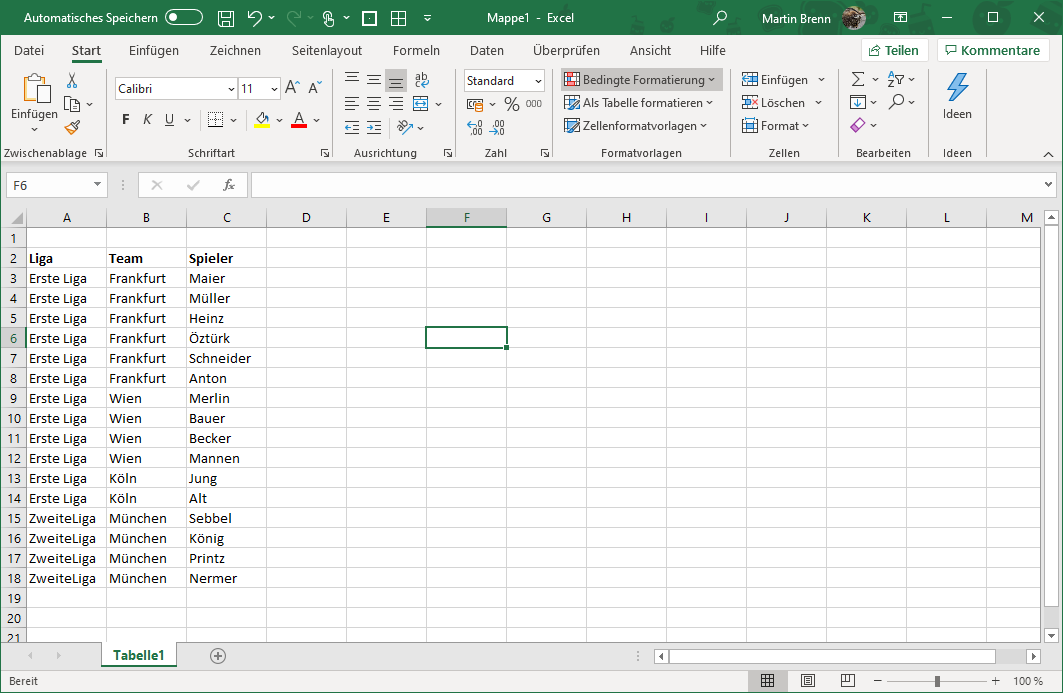
This table is converted into a tree structure with three levels:
League
> Team
> > Player
The following configuration is used for this:
ExcelLoaderConfig
| Name | Meaning |
|---|---|
filePath |
Filename from which to import. |
extentUri |
URI of the resulting extent. |
workspaceId |
ID of the workspace into which the resulting extent is inserted. |
sheetName |
Name of the Excel sheet from which to import. |
hasHeader |
Flag indicating whether the first column of the Excel sheet denotes headers. |
idColumnName |
Name of the column that optionally contains the ID. |
countRows |
Number of rows to be read. If 0 or negative, an attempt is made to automatically determine how many rows to process. |
countColumns |
Number of columns to be read. If 0 or negative, an attempt is made to automatically determine how many columns to process. |
offsetRow |
Number of rows to be skipped first before reading the Excel. Thus, the Excel does not necessarily have to start at A1. |
offsetColumn |
Number of columns to be skipped first before reading the Excel. Thus, the Excel does not necessarily have to start at A1. |
ExcelHierarchicalLoaderConfig
Derived from ExcelLoaderConfig
| Name | Meaning |
|---|---|
hierarchicalcolumns |
Column definitions describing the different hierarchy levels. This list of elements describes the content in the order of column depth. |
ExcelHierarchicalColumnDefinition
| Name | Meaning |
|---|---|
name |
Name of the column. This is usually the header. |
metaClass |
MetaClass that this column contains. |
property |
Property in which the children of the element are stored. For the last column, this property no longer has any meaning. |